
I tried using an eSIM for traveling around Europe

eSIM eliminates the need for a SIM card . Since the release of the iPhone XS in 2018 , I had hoped that I would no longer need to carry a mobile router when traveling abroad, but then COVID-19 hit and overseas travel became impossible...
Following my eSIM experience report on my first trip to Hawaii in three years in October 2022,
Purchase a European eSIM , I used it for a 10-night, 12-day trip to the Basque Country (Spain/France) and Paris !
There are so many eSIMs available these days that it can be hard to choose . We've compared several eSIMs that we looked into before our trip, so please use this as a reference!
Also, be sure to check out how much easier it is to set up than in Hawaii last time!!!
⬜️ Smartphone that can use eSIM
⬜️Comparing eSIMs from my trip to Europe
⬜️Compare the latest eSIMs by number of days
What is eSIM?
↓ No need for chip-type SIM cards
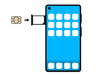 Typically, telecommunications companies provide small chip-type SIM cards for smartphones and tablets, which can be inserted to enable communication, but eSIMs are SIMs that are pre-embedded in devices. eSIMs allow communication by simply writing data to the eSIM without having to remove or insert it from the device, making them extremely convenient for people who have been purchasing and replacing local prepaid SIM cards when traveling abroad.
Smartphones equipped with eSIM can also be used with a regular SIM card, making them dual SIM devices that allow you to use two different carriers.
If you have a dual SIM smartphone, you can travel abroad and use cheap communication lines without having to rent and carry a mobile router or change SIM cards when you arrive.
Smartphones that can use eSIM
To use a prepaid eSIM in Hawaii, the SIM must be unlocked or SIM-free .
- All models from iPhone XS onwards (some iPhone models sold in China, Hong Kong and Macau may not be compatible)
- On Android devices,
- AQUOS sense4 lite, sense6 (some models not supported), zero6, wish
- Xperia 10 III Lite
- OPPO A73, Reno5 A, Find X3 Pro, A55s 5G
- Redmi Note 10T
- Google Pixel 4/4 XL, 4a, 4a(5G), 5, 5a(5G), 6/6 Pro, 6a
- HUAWEI Mate 40 Pro, P40 Pro 5G, P40
If you are using the above smartphones as a SIM-free device, you can use a prepaid eSIM .
Comparing eSIMs during a trip to Europe
[1] World eSIM
Features:
This service is provided by Vision Co., Ltd. (Tokyo), a company that provides Wi-Fi router rental services in Japan. You can make inquiries in Japanese, so you can rest assured.
◽️Tour of Europe
- 35 countries, 4G/5G
- Unlimited storage plan (3, 5, 7, 10, 15 days)
- Capacity Segen Plan (1, 3, 7, 30 days, capacity 500MB to 50GB) Charge option available
◽️Europe Tour (excluding Türkiye)
- 34 countries, 4G.5G
- 10-day unlimited plan 4,980 yen
【2】 JAPAN&GLOBAL eSIM 
Features:
This Taiwan-based company handles travel products, including SIM card and Wi-Fi rentals. It has a Japanese website, but there are few reviews from Japan. There are many similar plans, so be careful not to make a mistake.
◽️49 European regions
- Special trial campaign available: 500MB per day for 490 yen → 300 yen
- After reaching the limit, there is no limit at low speed (128kbps)
- Internet sharing: Not possible
[3] Glocal eSIM 
Features:
A Hong Kong-based communications service company offering three simple plans. It's a shame that you can't check your usage data.
◽️ Europe Tour 35 countries and regions 15 days 6GB, 20 days 10GB, 30 days 20GB
- An initial setup fee (profile issuance fee) of 770 yen is required (free during campaign)
- Once the capacity is reached, the connection will stop or become slow.
- Tethering available for all plans
【4】eSIM Mart
Features:
This prepaid eSIM is provided by Rental Telecom Square, the company that provides the Wi-Fi router "WIFIBOX" that you can pick up at the airport.
- Europe 5GB
- 15 days
- 4G
- Recharge not possible
[5] Rakuten Mobile
Although it is not an eSIM, Rakuten Mobile offers free data communication up to 2G per month (in addition to domestic data volume). If you run out of data, you can top it up for 500 yen per 1G , and if your trip spans a month, you can use up to 4G for free. Being able to use your regular smartphone as is is incredibly convenient!
-
Target countries: 71 countries and regions, including Hawaii
- After exceeding your data limit, you can continue using low-speed (128kbps) data as much as you like!
- Chargeable at 500 yen/1GB
- Tethering available
- Learn more

Compare the latest eSIMs by number of days
🔲5 days
| Plan | Tethering | Low-speed communication | traffic volume | price |
|
World eSIM |
◯ | - | Unlimited | ¥2,780 |
|
JAPAN&GLOBAL eSIM |
? |
128kbps |
1GB/day | ¥2,330 |

🔲7 days
| Plan | Tethering | Low-speed communication | traffic volume | price |
| World eSIM | ◯ | Chargeable | 3GB | ¥1,480 |
| World eSIM | ◯ | - | Unlimited | ¥3,980 |
|
JAPAN&GLOBAL eSIM |
? | 128kbps | 1GB/day | ¥3,150 |
🔲 15 days
| Plan | Tethering | Low-speed communication | traffic volume | price |
| World eSIM | ◯ | - | Unlimited | ¥6,880 |
| JAPAN&GLOBAL eSIM | ? | 128kbps | 1GB/day | ¥5,800 |
| Glocal eSIM | ? | ? | 6GB | ¥4,960→¥3,480 |
| eSIM Mart | ? | ? | 5GB | ¥2,890 |
🔲 30 days
| Plan | Tethering | Low-speed communication | traffic volume | price |
| World eSIM | ◯ | - | 5GB | ¥2,146 |
| 10GB | ¥3,034 | |||
| 15GB | ¥3,922 | |||
| 30GB | ¥7,622 | |||
| 50GB | ¥12,062 | |||
| JAPAN&GLOBAL eSIM | ? | ? | 1GB/day | ¥10,830 |
| Glocal eSIM | ? | ? | 20GB | ¥8,960→¥6,480 |
Differences between the eSIM used and the previous one
As with the Hawaii trip, we will be using the hotel Wi-Fi for internet access.
When I'm around town, I use Google Maps and transit apps. Since I only need to search for store information, 300MB/day is enough. However, I want to be able to top up in case of unexpected emergencies. Since I prioritized the availability of support, I purchased the World eSIM 30-day 5GM for ¥2,146. My trip was 10 nights and 12 days, but there wasn't a plan that fit my needs for 15 days, so the very reasonable price was the deciding factor.
result,
⭐️ Simply scan the QR code in advance in Japan and follow the setup instructions.
⭐️ The plan starts from the time communication starts locally, and the number of days is calculated every 24 hours.
⭐️ After returning to Japan, there is no need to reset the profile for domestic mineo lines.
in short,
① Scan the QR code to set up
② Simply change the "Mobile Communication" setting on the Settings and Mobile Communication screen when you arrive at your destination and when you return home.
It was!